
How to Create Stunning Animated Videos for Digital Marketing with Renderforest
Animated videos have become a practical way for businesses to explain products, promote services, tell brand stories, and connect with audiences online. Whether you run a small business, manage social media accounts, work as a freelancer, or operate an online store, engaging video content can help you communicate your message more clearly. The challenge is that traditional video production often requires specialist software, animation skills, equipment, and considerable time. This is where Renderforest can help.
Renderforest combines customizable video templates with AI-powered video, image, and voiceover tools. According to its official website, the platform has attracted more than 40 million creators and supported over 120 million projects. Its library includes more than 1,200 video templates for animations, promotional content, social media videos, logo introductions, and other creative projects.
The real opportunity, however, is not simply making a video that looks attractive. It is creating content that serves a marketing purpose, communicates one clear message, represents your brand, and encourages viewers to take action. In this guide, you will learn how to use Renderforest to create animated marketing videos, select suitable templates, write effective scripts, maintain consistent branding, optimize videos for different platforms, and measure their performance.
Table of Contents
Understanding Animated Videos in Digital Marketing
Animated videos use moving illustrations, text, shapes, characters, icons, or digitally generated scenes to communicate an idea. Unlike conventional video, which may require actors, physical locations, and camera equipment, animation can represent abstract concepts and imaginary situations without a physical production setup. For example, a software company can animate the journey of customer data through its platform, while an online clothing store can use animated typography and product visuals to announce a seasonal sale. These formats make animation especially useful when a business needs to explain something quickly or turn a complicated idea into an understandable story.
In digital marketing, animation can support several stages of the customer journey. A short introductory video can introduce an unfamiliar brand, an explainer can answer questions about a product, and a promotional animation can highlight an offer or encourage viewers to visit a website. The format also gives marketers flexibility because scenes, headlines, colors, and calls to action can be updated without repeating an entire live-action shoot. With a tool such as Renderforest, you can begin with a professionally designed template or explore AI-generated video creation, depending on the project you have in mind. The most effective approach is to select a format that matches your marketing objective rather than choosing animation simply because it looks impressive.
Why Animation Works for Online Audiences
Online audiences encounter a constant stream of advertisements, social posts, product announcements, and entertainment. A well-designed animated video can help a message stand out through movement, visual contrast, storytelling, and sound. Instead of presenting a page full of product details, you can show how a product solves a problem through a sequence of short, connected scenes. This approach makes the information easier to follow and gives the viewer a reason to continue watching. Animation is also adaptable: a single campaign concept can become a short social video, a longer website explainer, and a presentation asset.
Still, attractive visuals alone do not guarantee results. If an animation contains too many effects, lengthy explanations, or unrelated scenes, viewers may lose interest before they understand the offer. Your video should establish its main message early, use supporting visuals purposefully, and end with a clear next step. Think of animation as a visual conversation rather than a moving poster. Each scene should help answer a question, communicate a benefit, or move the viewer closer to a decision.
Benefits of Using Renderforest
Renderforest is designed to make video production accessible to users who may not have advanced animation or editing skills. Its template-based workflow allows creators to choose a visual style, customize scenes, add text and media, and prepare a video for publishing. The platform also offers AI-powered creation tools, image generation, voiceover options, and a broader creative workspace. These features can be useful when you need to produce marketing assets regularly but do not have the budget or time to build every video from scratch.
Another advantage is the ability to create different types of content within one platform. A business might prepare an animated logo introduction, a product explainer, a social media promotion, and a presentation video while maintaining a related visual style. However, template availability and export quality depend on the selected tools and subscription plan. You should review the current plan details before committing to a campaign, especially if you need high-resolution exports, commercial-use features, or particular AI models. Ultimately, Renderforest can simplify production, but the quality of the result still depends on your script, design decisions, brand consistency, and understanding of your audience.
Planning Your Animated Video Marketing Strategy
Before opening Renderforest, take a few minutes to decide what your video should accomplish. This step may seem less exciting than selecting animation styles, but it can save time and prevent unnecessary editing. A marketing video needs a clear purpose, whether that is introducing your company, explaining a service, generating website traffic, collecting leads, or encouraging a purchase. When the goal is defined, you can make better decisions about the script, visuals, length, tone, and final call to action. Without a plan, it is easy to create something visually attractive that fails to deliver a useful message.
Start by identifying the problem your audience wants to solve. A small business owner might need a simple way to promote a new service, while an online shopper might want to understand a product’s benefits before ordering. Your animation should address that need directly. Next, decide where the video will appear, because a vertical social media clip has different requirements from a widescreen website explainer. Finally, choose one primary action you want viewers to take. This could be visiting a landing page, exploring a product, subscribing to a channel, or contacting your business. A focused strategy gives every creative decision a reason to exist.
Define Your Target Audience and Marketing Goal
Your target audience determines how your animated video should look, sound, and communicate. A video aimed at young social media users may benefit from energetic pacing, bold typography, and conversational language, while a video for business decision-makers may require a more measured presentation, clear diagrams, and specific explanations. Consider your audience’s age range, interests, knowledge level, common concerns, and preferred platforms. You do not need to create a complicated research report before producing a short video, but you should understand whom you are trying to reach and what matters to them.
Once you understand your audience, select a measurable goal. For example, if you want to increase awareness, you might monitor reach and video views. If you want to generate leads, you could measure landing-page visits and completed enquiry forms. If you want to promote a product, you may focus on clicks, add-to-cart activity, or sales attributed to the campaign. These goals influence the video itself. A brand awareness animation may prioritize a memorable visual identity, whereas a conversion-focused video needs a compelling benefit and an obvious next step. Choose one primary objective and a small number of supporting metrics so you can judge whether the content is working.
Write a Compelling Video Script
A strong script is the foundation of an effective animated video. Even the most sophisticated animation cannot rescue a message that is confusing or irrelevant to the viewer. Begin with a hook that identifies a problem, raises a useful question, or introduces a benefit. Follow it with a concise explanation of your solution, demonstrate why it matters, and finish with a call to action. This structure gives the animation a natural direction and helps you decide which scenes are necessary. It also prevents the common mistake of filling the timeline with decorative visuals that do not support the message.
Imagine that you are promoting an online image-compression tool. Your opening might ask, “Are large images slowing down your website?” The next scenes could show oversized files, explain how compression reduces file size, and demonstrate how a faster-loading page benefits visitors. The final scene could invite viewers to try the tool. Each part contributes to the same story, so the viewer does not have to work hard to understand the point. Before creating your video, read the script aloud and remove repetitive phrases, unnecessary technical terms, and unsupported claims. If the narration sounds natural in conversation, it will usually be easier to adapt into engaging video content.
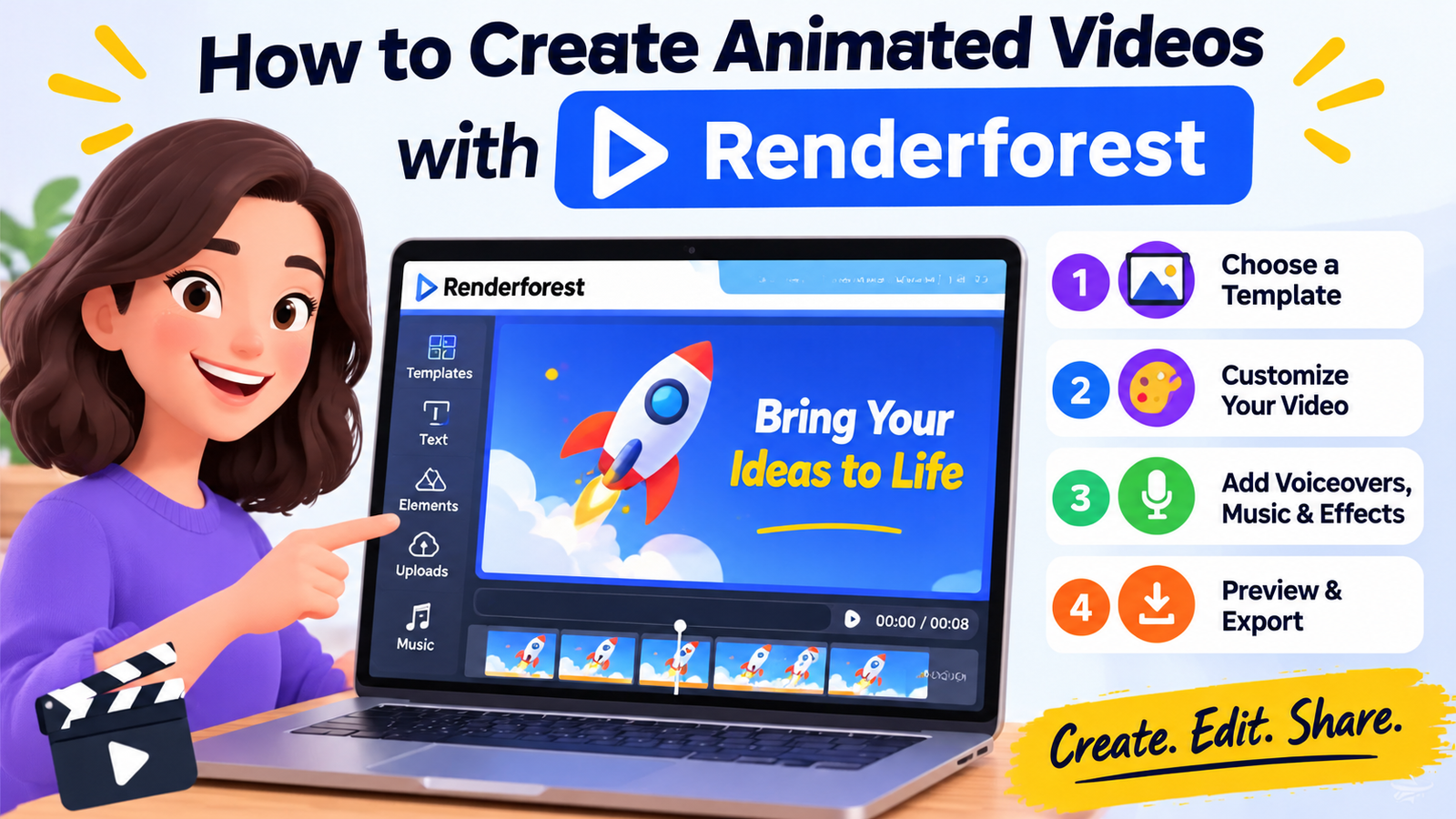
How to Create Animated Videos with Renderforest
Renderforest offers two useful starting points: customizable templates and AI-assisted video generation. Templates work well when you want a structured animation with an established visual style, while AI creation can help turn an idea or script into an initial video concept. The platform’s current workflow includes options for writing a prompt or script, choosing a video style, and using features such as AI voiceover and logo inclusion. Exact controls may vary according to the tool or template you select.
Choose the Right Video Template
Begin by exploring the template categories that match your marketing objective. Renderforest lists options for animations, explainer videos, logo introductions, promotional content, social media videos, slideshows, typography videos, and music visualizations.
If you are introducing a brand, an animated logo or typography template might be appropriate. If you are explaining how a service works, an explainer animation with a clear sequence of scenes may be a better fit. For a limited-time promotion, look for a template that gives your offer and call to action enough visual space.
Do not choose a template solely because it looks exciting in the preview. Check whether its pacing, visual style, scene structure, and text areas suit your message. A template with dramatic transitions might work well for an entertainment promotion but feel distracting in a detailed business explainer. Similarly, a template designed around long text passages may be unsuitable for a short mobile advertisement. Look at the opening, middle, and closing scenes before committing to a design. Selecting the right foundation can reduce the number of changes you need to make later and help your finished video feel more cohesive.
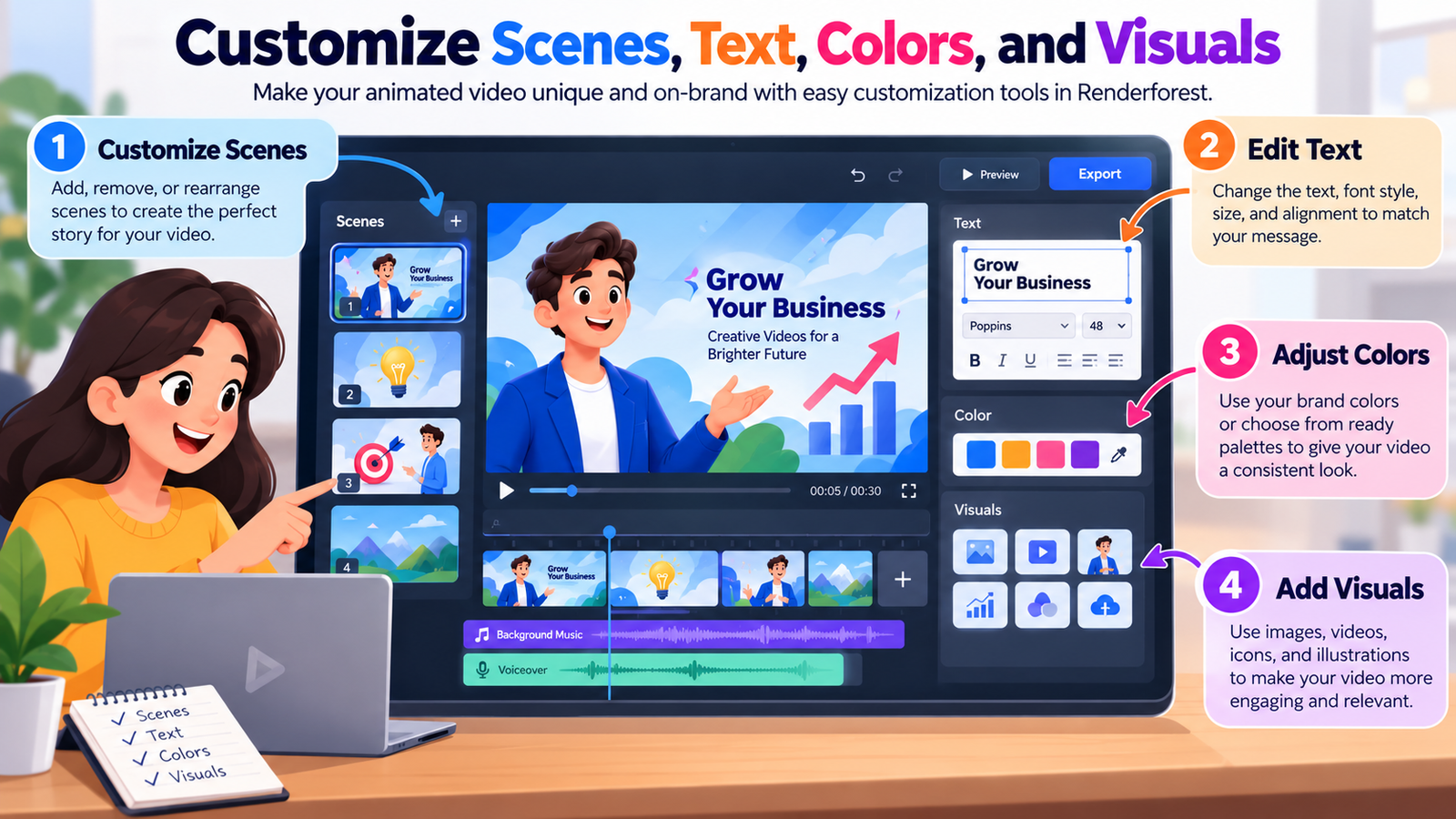
Customize Scenes, Text, Colors, and Visuals
Once you have chosen a suitable template, adapt it to your brand rather than leaving it in its default form. Replace sample text with your own script, add relevant images or footage, and remove scenes that do not contribute to the story. Keep headings short enough to read comfortably on a phone screen, and make sure important words remain visible long enough for viewers to understand them. If the template supports different visual elements, use them to demonstrate your product, explain a process, or highlight a customer benefit instead of adding decoration without a clear purpose.
Color and typography are equally important. Use your brand colors consistently, select readable fonts, and maintain enough contrast between text and its background. If your logo is colorful, place it against a background that keeps it visible without overpowering the message. Avoid switching fonts or animation styles every few seconds, because excessive variation can make a video feel disconnected. A simple rule is to give each scene one primary idea and one main visual focus. When every scene has a clear role, the finished animation is easier to follow and more likely to look professional.
Add Voiceovers, Music, and Sound Effects
Audio can transform an ordinary sequence of animated scenes into a more engaging story. A voiceover explains what the viewer is seeing, while background music helps establish the mood. Sound effects can emphasize a transition, reveal a product feature, or make an animated action feel more natural. Renderforest provides AI voiceover capabilities and other audio features, making it possible to develop a video without recording every narration track yourself. Its current platform information describes AI voices in more than 20 languages.
When selecting a voice, consider the audience and message. A friendly conversational voice may suit a consumer product, while a calm, clear narration may be more appropriate for a professional service. Speak at a natural pace and leave small pauses after important statements so viewers have time to process the information. Keep background music quieter than the narration, and avoid using dramatic sound effects that compete with the main message. If your video will be watched without sound, add readable on-screen captions where appropriate. Before publishing, confirm that you have the necessary rights to use the selected music, footage, and other media in your intended commercial campaign.
Preview, Edit, and Export Your Video
The first version of an animated video is a draft, not necessarily the finished product. Preview the complete timeline and check whether the opening communicates the topic quickly, the scenes flow naturally, and the ending makes the next action clear. Look for text that disappears too soon, awkward transitions, inconsistent colors, audio that feels too loud, and visuals that do not match the narration. Watching the video once for the overall story and again for small technical problems can help you spot issues you might otherwise miss. If possible, ask someone unfamiliar with the project to watch it and explain what they understood.
After editing, select an export quality and aspect ratio that suit your intended platform and budget. Renderforest’s current subscription information lists template exports at HD 720p for Lite, Full HD 1080p for Pro, and up to Ultra HD 4K for Business on supported templates.
These options can change, so check the current terms before exporting. Review the finished file on a mobile device as well as a computer, particularly if you plan to publish it on social media. Confirm that the logo, captions, and call to action remain legible, then save a clean master version so you can prepare additional formats for other channels.
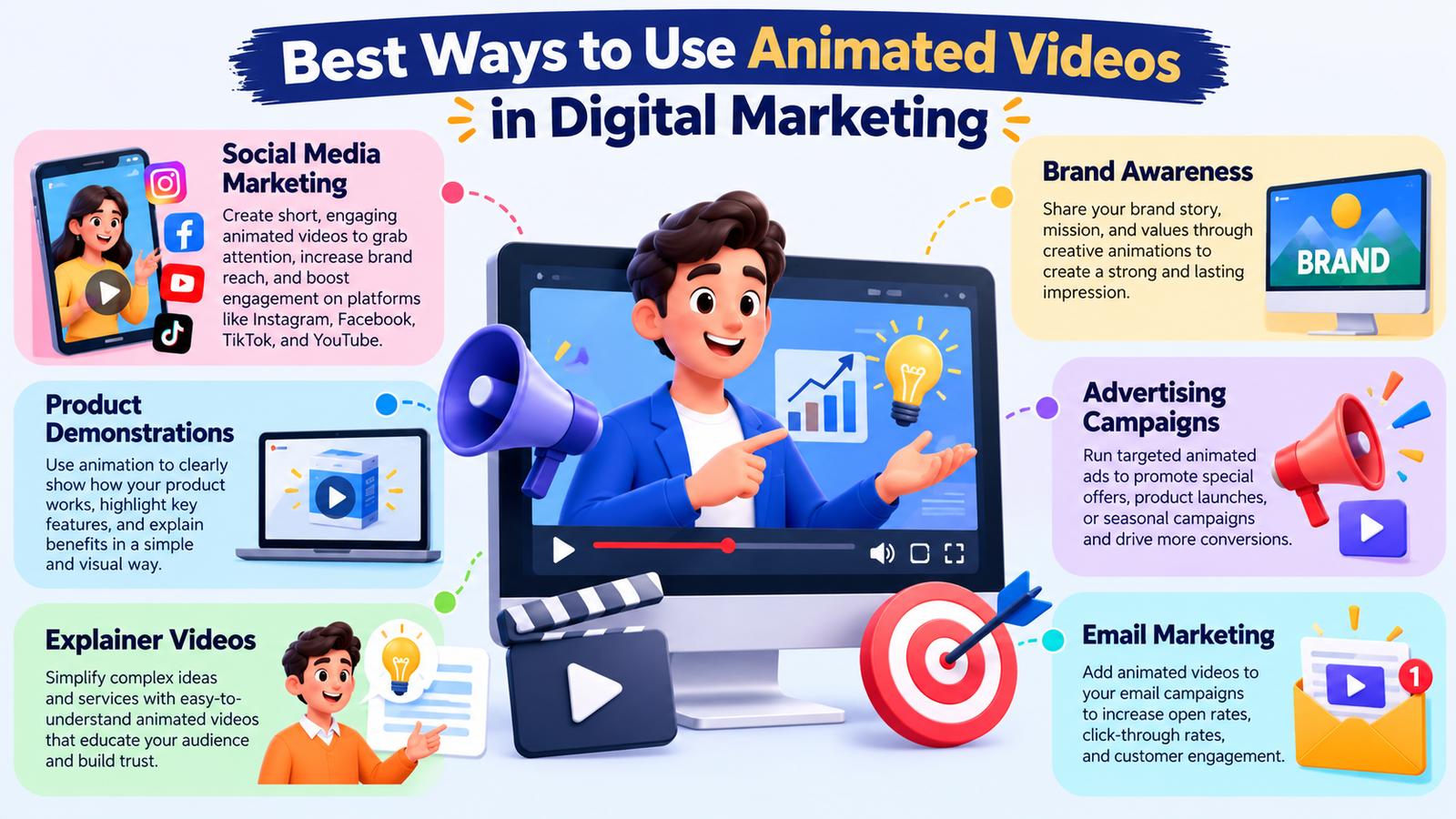
Best Ways to Use Animated Videos in Digital Marketing
Animated videos are flexible enough to support many different marketing activities. The same basic technique can introduce a business, demonstrate a service, explain a complicated process, or promote an upcoming event. The key is to match the animation to the viewer’s needs and the stage of the customer journey. A person discovering your brand for the first time may need a simple introduction, while someone comparing products may want a focused demonstration of features and benefits. Planning different videos for these situations can help you communicate more effectively than trying to fit every message into one long presentation.
Social Media Marketing
Social media is a natural place to use short animated videos because motion, color, and concise messaging can help introduce an idea in a busy feed. You could create a product teaser, a quick tip, a seasonal offer, a countdown to a launch, or a short explanation of a common customer problem. Renderforest offers social media video templates that help creators develop content for platforms such as Instagram, Facebook, and TikTok.
Choose the format and dimensions based on the placement you intend to use, and verify the latest specifications for the platform before exporting.
For example, a bakery could publish a short animation announcing a new cake flavor, showing its name, highlighting the ingredients, and inviting customers to place an order. A software company might create a sequence of animated tips demonstrating shortcuts or useful features. In either case, the opening should give viewers a reason to stop scrolling, and the rest of the video should deliver on that promise. Use captions when they improve accessibility and comprehension, and avoid cramming too much information into a few seconds. Instead of expecting every post to generate an immediate sale, use social content to build recognition, answer questions, and encourage meaningful interaction over time.
Product Demonstrations and Explainer Videos
Explainer videos help audiences understand what a product does, how a service works, and why a particular solution might be useful. They are especially valuable when a product involves several steps or a concept that is difficult to describe through static images alone. Animation can represent a process visually, show how different features connect, and illustrate a problem before revealing the solution. This makes it a practical format for software companies, online services, educational businesses, and brands that need to simplify complex information.
To build an effective explainer in Renderforest, start with one common customer problem and organize the video around a solution. Introduce the challenge, demonstrate the relevant features, explain the practical benefit, and close with a suitable next step. Use screenshots, icons, labels, or animated diagrams only when they make the explanation clearer. For example, an online booking platform might show a customer selecting a date, comparing available options, and completing a reservation. Keep the explanation honest and avoid implying that the animation represents functionality your product does not actually offer. A useful explainer should reduce uncertainty and help viewers make an informed decision rather than relying on exaggerated promises.
Brand Awareness and Advertising Campaigns
Brand awareness campaigns aim to make a business recognizable and memorable. Animated logo introductions, brand-story videos, promotional clips, and motion-based advertisements can all support this objective. With Renderforest, you can create visual content that combines a logo, a short tagline, brand colors, and a consistent animation style. Repeating these visual elements across multiple videos helps viewers connect different pieces of content with the same business. The result can be a more recognizable identity across social media, landing pages, email campaigns, and presentations.
For advertising, however, brand recognition should work alongside a relevant message. A beautiful animation that never explains the offer may generate attention without motivating action. Develop a campaign around one benefit, audience need, or product feature, and adapt the creative for each placement. A short advertisement may introduce the benefit quickly, while a longer website video can provide more detail for interested visitors. Use clear calls to action, avoid misleading claims, and make sure the destination page matches what the video promises. When the advertisement and landing page tell the same story, the customer experience feels more consistent and trustworthy.
Optimizing Animated Videos for Better Results
Creating an attractive animation is only the beginning of a successful video marketing campaign. You also need to make sure the content fits the platform, represents your business accurately, and gives viewers a useful reason to engage. A video that performs well on one channel may need a different opening, aspect ratio, caption style, or call to action on another. Rather than publishing the same file everywhere without review, treat each platform as a different viewing environment. Small adjustments can make your content easier to watch and more relevant to the audience encountering it.
Optimization also involves learning from results. If viewers leave before the main benefit appears, your introduction may be too slow. If they watch the entire video but rarely click, your offer or call to action may need improvement. If the video attracts views from the wrong audience, revisit the message and targeting. These patterns do not automatically reveal the cause of a problem, but they give you useful questions to investigate. By testing one meaningful change at a time, you can improve your videos based on observed behavior instead of relying entirely on personal preference.
Maintain Brand Consistency
Brand consistency makes your videos feel like part of the same business rather than unrelated creative experiments. Start by establishing a small set of visual guidelines covering your logo, color palette, fonts, illustration style, and preferred tone of voice. Apply these choices across your animations wherever the format allows. Renderforest’s platform includes branding-related tools and options for custom color palettes and fonts in applicable subscription tiers, so you can investigate whether these features suit your workflow.
Consistency does not mean every video must look identical. You can create a playful product announcement and a more serious educational explainer while retaining recognizable brand elements. Keep your logo visible when appropriate, but do not let it dominate the screen. Use a familiar color palette and typography, and maintain a consistent approach to language and messaging. It is also helpful to save approved scripts, logos, and design assets in an organized folder so that future videos are easier to produce. Over time, this approach can reduce repetitive work and help your audience recognize your content more quickly.
Optimize Video Length and Format
There is no single ideal length for every marketing video. A short promotional clip may need only enough time to communicate one benefit, while a product tutorial may require a longer explanation. The right duration depends on the complexity of your message, the viewer’s level of interest, and the platform where the content appears. Instead of adding scenes simply to make a video longer, remove anything that does not support the central idea. If a scene repeats information viewers already understand, consider shortening it or replacing it with a more useful demonstration.
Aspect ratio is equally important. Vertical formats are often suitable for mobile-first social placements, square videos can work well in certain feeds, and widescreen formats are common for website explainers and presentations. Check the current technical specifications of the destination platform before exporting. Make sure important text stays within safe areas, captions do not cover essential visuals, and the final frame remains readable. If you plan to reuse one animation across several channels, keep a clean master project and create separate versions where needed. This gives you more flexibility than stretching or cropping a single finished file to fit every placement.
Measure Performance and Improve Engagement
Marketing analytics help you determine whether your video is achieving its purpose. Begin with the metric that matches your campaign goal. For awareness, examine reach, impressions, and relevant video-view measures. For engagement, consider watch time, completion rate, shares, saves, and comments. For traffic or sales, evaluate click-through rate, landing-page activity, leads, and conversions. Remember that platforms may define a video view differently, so compare results using consistent definitions rather than assuming every view represents the same level of attention.
Use these findings to plan your next version. If a product demonstration attracts interest but produces few website visits, try making the call to action more specific or aligning it more closely with the viewer’s needs. If viewers leave early, experiment with a clearer opening or introduce the main benefit sooner. If engagement is strong but conversions remain low, investigate the landing page, offer, and audience targeting as well as the video itself. Test one substantial change at a time when practical, and compare results over a meaningful period. This process turns animation from a one-off design task into a repeatable marketing activity that improves through experience.
A Complete Guide to Building a Successful Remote Work Environment
How Online Travel Platforms Like Musement Make Experience Planning Easier
Discovering Ferry Routes and Travel Services Available With MrFerry DE
A Complete Guide to Understanding the Online Lottery Experience With Lottoland
How Digital Threats Are Driving Interest in Services Like Kaspersky.se
Renderforest Pricing and Common Mistakes to Avoid
Renderforest offers free access to selected tools and paid subscription tiers with different export options, AI credits, storage allowances, and creative features. According to the official subscription page, the listed monthly prices at the time of checking are $8 for Lite, $19 for Pro, and $39 for Business, with separate annual billing options. The plan comparison lists different export resolutions and levels of access to stock assets and AI generation. Because pricing, credits, and included features can change, treat these figures as a snapshot rather than a permanent price guarantee.
Plan | Listed monthly price | Relevant video features |
Free | Free to try | Explore selected tools; free exports may include a watermark |
Lite | $8 | HD 720p template exports and monthly AI credits |
Pro | $19 | Full HD 1080p template exports, more AI credits, and a larger stock library |
Business | $39 | Up to 4K template exports on supported templates, more AI credits, and team-related features |
Prices shown are based on Renderforest’s official subscription page checked in October 2026. Currency is USD; taxes, billing frequency, regional offers, and feature availability may vary. Confirm the current terms before purchasing.
The best plan depends on what you need to create. If you are experimenting with animation or producing a small number of basic videos, start by exploring the free options. If you regularly publish client work or need watermark-free Full HD exports, compare the paid tiers and their applicable commercial-use terms. If your team needs shared workflows, additional storage, or supported 4K exports, evaluate whether the higher tier provides enough value to justify its cost. Do not select a plan simply because it has the most features; choose one that matches your actual production requirements.
There are several common mistakes worth avoiding. First, do not rely on a template without adapting its message and visuals to your audience. Second, avoid excessive transitions, crowded text, and music that overwhelms narration. Third, do not assume an AI-generated scene will always represent your product accurately; inspect every scene and correct misleading details. Fourth, check the usage rights for stock media, fonts, music, and other assets, particularly when creating advertisements for clients. Finally, do not publish without reviewing the exported file and testing the call to action. A few minutes of quality control can prevent an otherwise strong marketing video from looking unfinished or sending viewers to the wrong destination.
Conclusion
Creating stunning animated videos for digital marketing does not have to involve complicated software, expensive equipment, or advanced animation skills. With Renderforest, you can explore customizable templates, experiment with AI-powered video creation, add voiceovers, and develop branded content for different marketing channels. The platform gives beginners and experienced marketers a practical starting point for producing promotional videos, explainer animations, social media content, and brand introductions.
The secret to getting good results is to combine the right tools with a clear strategy. Understand your audience, write a focused script, choose an appropriate template, maintain consistent branding, and review every scene before publishing. Then measure performance to discover what captures attention and encourages viewers to act. Remember, your goal is not simply to create a beautiful animation; it is to deliver a useful message that helps your audience understand your business and take the next step.
Start with one small project, such as a 30-second product promotion or a short animated introduction to your business. Learn how the editing workflow operates, experiment with different visual approaches, and improve your next video using feedback and performance data. With consistent practice and thoughtful planning, Renderforest can become a useful part of your digital marketing toolkit.
Frequently Asked Questions
Q. What is Renderforest, and how does it help with digital marketing?
A. Renderforest is an online creative platform that provides video templates, animation tools, AI-powered video and image generation, and voiceover capabilities. Marketers can use it to create promotional videos, animated logo introductions, product explainers, social media content, and other branded materials. Its template-based workflow helps users create videos without needing advanced animation skills, although reviewing and customizing the results is still important.
Q. Can beginners create animated marketing videos with Renderforest?
A. Yes. Beginners can start with a ready-made template, replace the sample text, add relevant visuals, customize colors, and adjust the scenes to match their message. AI-assisted video creation can also help turn a written idea into an initial draft. Start with a simple project, preview the result carefully, and learn the editing features before moving on to more complex campaigns.
Q. Is Renderforest free to use?
A. Renderforest offers free access to selected tools and features, allowing users to explore the platform before purchasing a subscription. Free exports may include watermarks or have other limitations. Paid plans provide different export resolutions, AI credits, storage allowances, and additional features.
Q. How long should an animated marketing video be?
A. The ideal length depends on your marketing goal, audience, platform, and message. A short social media promotion may communicate one benefit in a few seconds, while a detailed explainer or tutorial may require more time. Focus on delivering the essential information without unnecessary scenes. Review watch time and completion data to understand whether your audience is staying engaged.
Q. How can I make my Renderforest videos more effective for SEO?
A.Use descriptive video titles, relevant keywords, informative descriptions, and accurate captions or transcripts where appropriate. Embed relevant videos on useful website pages and provide supporting written content that answers the same audience questions. Optimize the page's loading speed, use an appropriate video thumbnail, and include a clear call to action. Video content alone does not guarantee higher search rankings, so combine it with helpful content, sound technical SEO, and a positive user experience.
Table of Contents
Related Posts